The ROS Wrapper for RealSense™ cameras allows you to use RealSense™ cameras with ROS1.
These are the ROS (1) supported Distributions:
:pushpin: Note: The latest ROS (1) release is version 2.3.2.
- Noetic Ninjemys (Ubuntu 20.04 Focal)
- Melodic Morenia (Ubuntu 18.04 Bionic)
- Kinetic Kame (Ubuntu 16.04 Xenial)
ROS Documentation and Installation instructions can be found at: https://docs.ros.org
:pushpin: Note: Check the ROS Release documentation at ROS official distributions
:pushpin: Note: Check https://realsenseai.com/message-to-customers/ for supported cameras.
Getting Started
- ROS1 installation Instructions and distributions – link
ROS Camera nodes examples
| Link to Example | Experience level | Supported Cameras | Link to GitHub |
|---|---|---|---|
| Starting camera node | ⭐ | D400, L500, T265 | rs_camera.launch |
| PointCloud visualization | ⭐ | D400 | demo_pointcloud.launch rs_rgbd.launch rs_d435_camera_with_model.launch |
| Align Depth | ⭐ | D400 | rs_aligned_depth.launch |
| T265 examples | ⭐ | T265 | rs_t265.launch demo_t265.launch |
| Open from File | ⭐ | D400, L500, T265 | rs_from_file.launch |
| Multiple D400 cameras | ⭐:star: | D400 | rs_multiple_devices.launch |
| D400 +T265 cameras | ⭐:star: | D400+T265 | rs_d400_and_t265.launch |
| SLAM with T265 and D400 | ⭐:star: | D400+T265 | rs_rtabmap.launch |
| 2D occupancy map with D400 + T265 | ⭐:star: | D400+T265 | occupancy |
| Object Analytics | ⭐:star: | D400 | ros_object_analytics |
| Multiple cameras showing a semi-unified pointcloud | ⭐:star: | D400 | Showcase-of-using-2-cameras |
Published Topics
The published topics differ according to the device and parameters.
See the table below for Topics supported according to SKUs.
For a full list of topics type ‘rostopic list‘ with your camera connected.
D400 Stereo Depth Cameras
| Feature | Topic | Camera Model |
|---|---|---|
| Color | /camera/color/camera_info /camera/color/image_raw /camera/rgb_camera/auto_exposure_roi/parameter_descriptions /camera/rgb_camera/auto_exposure_roi/parameter_updates /camera/rgb_camera/parameter_descriptions /camera/rgb_camera/parameter_updates | Applies to all D400 camera with RGB, ie: D415, D435, D435i, D455
|
| Depth/Stereo | /camera/depth/camera_info /camera/depth/image_rect_raw /camera/stereo_module/auto_exposure_roi/parameter_descriptions /camera/stereo_module/auto_exposure_roi/parameter_updates /camera/stereo_module/parameter_descriptions /camera/stereo_module/parameter_updates | All D400
|
| Extrinsics | /camera/extrinsics/depth_to_color /camera/extrinsics/depth_to_infra1 /camera/extrinsics/depth_to_infra2 | All D400 after enabling color/infra1/infra2 |
| Left IR Imager | /camera/infra1/camera_info /camera/infra1/image_rect_raw | All D400 after enabling infra1 |
| Right IR Imager | /camera/infra2/camera_info /camera/infra2/image_rect_raw | All D400 after enabling infra2 |
| PointCloud | /camera/depth/color/points | All D400 after enabling pointcloud |
| IMU | /camera/motion_module/parameter_descriptions /camera/motion_module/parameter_updates /camera/gyro/imu_info /camera/gyro/sample (See Note) /camera/accel/imu_info /camera/accel/sample (See Note) | Applies to all D400 cameras with IMU: D435i, D455
Notes:
|
| Other | /diagnostics /tf /tf_static | All D400 |
L500 Lidar Depth Cameras
| Feature | Topic | Camera Model |
|---|---|---|
| Color | /camera/color/camera_info /camera/color/image_raw /camera/rgb_camera/parameter_descriptions /camera/rgb_camera/parameter_updates | L515 |
| Depth | /camera/depth/camera_info /camera/depth/image_rect_raw /camera/l500_depth_sensor/parameter_descriptions /camera/l500_depth_sensor/parameter_updates | L515 |
| IR Imager | /camera/infra/camera_info /camera/infra/image_raw | L515 after enabling infra |
| Extrinsics | /camera/extrinsics/depth_to_color | L515 |
| PointCloud | /camera/depth/color/points | L515 after enabling pointcloud |
| IMU | /camera/motion_module/parameter_descriptions /camera/motion_module/parameter_updates /camera/gyro/imu_info /camera/gyro/sample (See Note) /camera/accel/imu_info /camera/accel/sample (See Note) | L515
Notes:
|
| Other | /diagnostics /tf /tf_static | L515 |
T265 Tracking Camera
| Feature | Topic | Camera Model |
|---|---|---|
| Odometry | /camera/odom/sample | T265 |
| Tracking | /camera/tracking_module/parameter_descriptions /camera/tracking_module/parameter_updates | T265 |
| Fisheye | /camera/fisheye1/camera_info /camera/fisheye1/image_raw /camera/fisheye2/camera_info /camera/fisheye2/image_raw | T265 after enabling fisheye1, fisheye2 |
| IMU | /camera/gyro/imu_info /camera/gyro/sample (See Note) /camera/accel/imu_info /camera/accel/sample (See Note) | T265
|
| Other | /diagnostics /tf /tf_static | T265 |
:pushpin: Note: ‘/camera’ prefix can be modified:
- The “/camera” prefix in the topics is the default parameter and can be changed – refer to tf_prefix parameter in the table below.
- rs_multiple_devices.launch demonstrates how to modify the /camera prefix for multiple cameras
Launch parameters
| Feature | Topic | Comment |
|---|---|---|
| compressed-image-transport | /camera/color/image_raw/compressed /camera/color/image_raw/compressed/parameter_descriptions /camera/color/image_raw/compressed/parameter_updates /camera/depth/image_rect_raw/compressed /camera/depth/image_rect_raw/compressed/parameter_descriptions /camera/depth/image_rect_raw/compressed/parameter_updates /camera/infra1/image_rect_raw/compressed /camera/infra1/image_rect_raw/compressed/parameter_descriptions /camera/infra1/image_rect_raw/compressed/parameter_updates /camera/infra2/image_rect_raw/compressed /camera/infra2/image_rect_raw/compressed/parameter_descriptions /camera/infra2/image_rect_raw/compressed/parameter_updates | Requires compressed-image-transport package installed such as package ros-kinetic-compressed-image-transport |
| compressed-depth-image-transport | /camera/color/image_raw/compressedDepth /camera/color/image_raw/compressedDepth/parameter_descriptions /camera/color/image_raw/compressedDepth/parameter_updates /camera/depth/image_rect_raw/compressedDepth /camera/depth/image_rect_raw/compressedDepth/parameter_descriptions /camera/depth/image_rect_raw/compressedDepth/parameter_updates /camera/infra1/image_raw/compressedDepth /camera/infra1/image_raw/compressedDepth/parameter_descriptions /camera/infra1/image_raw/compressedDepth/parameter_updates /camera/infra2/image_rect_raw/compressedDepth /camera/infra2/image_rect_raw/compressedDepth/parameter_descriptions /camera/infra2/image_rect_raw/compressedDepth/parameter_updates | Requires compressed-depth-image-transport package installed such as package ros-kinetic-theora-image-transport |
| theora-image-transport | /camera/color/image_raw/theora /camera/color/image_raw/theora/parameter_descriptions /camera/color/image_raw/theora/parameter_updates /camera/depth/image_rect_raw/theora /camera/depth/image_rect_raw/theora/parameter_descriptions /camera/depth/image_rect_raw/theora/parameter_updates | Requires theora-image-transport package installed such as package ros-kinetic-theora-image-transport |
📘 Notes:
(1) See detail description of filters at Post-processing filters
- colorizer: will color the depth image. On the depth topic an RGB image will be published, instead of the 16bit depth values.
- pointcloud: will add a pointcloud topic /camera/depth/color/points. The texture of the pointcloud can be modified in rqtreconfigure (see below) or using the parameters:_pointcloud_texture_stream and pointcloud_texture_index. Run ‘rqt_reconfigure’ to see available values for these parameters.
(2) Setting unite_imu_method creates a new topic, imu, that replaces the default gyro and accel topics. The imu topic is published at the rate of the gyro. All the fields of the Imu message under the imu topic are filled out.
- linear_interpolation: Every gyro message is attached by the accel message interpolated to the gyro’s timestamp.
- copy: Every gyro message is attached by the last accel message.
Dynamic Reconfigure Parameters
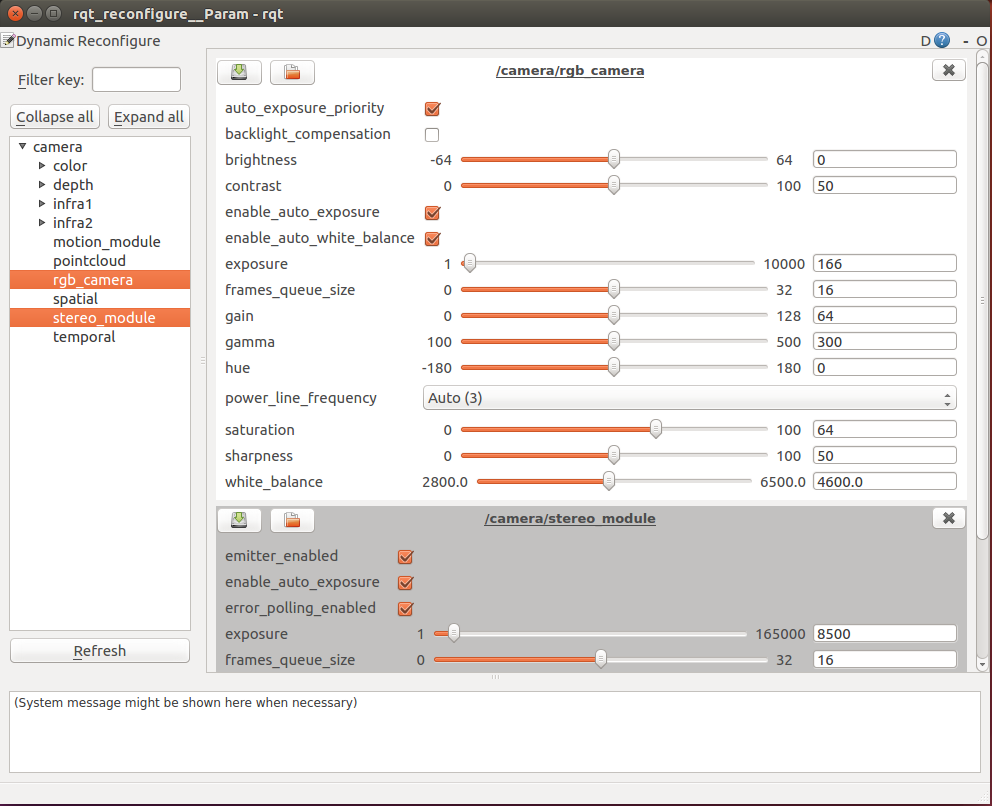
The following command allow to change camera control values using [http://wiki.ros.org/rqt_reconfigure].
rosrun rqt_reconfigure rqt_reconfigure